OTF to SVG Converter

Upload an OTF font, type your text, and download SVG vector paths for a wordmark, label, or individual character. This free OTF to SVG converter reads your font in your browser, without installing it or sending it to a conversion server.

OTF font upload
Local font processing
SVG vector paths
Text To SVG Options
Text To SVG Preview
Enter text to see preview
SVG Options

Fine-tune export units, fill behavior, and stroke output.

Text To SVG Output

See what an OTF ligature changes

Compare office AV in Source Serif 4 Regular, version 4.005. The ffi sequence becomes one glyph with standard ligatures enabled. These two path exports use the same scale so you can inspect the joins and the width change.
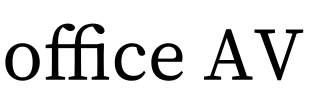
Source Serif 4: office AV · Standard ligatures on

Standard ligatures on

Advance width: 302.175 px

Download this SVG
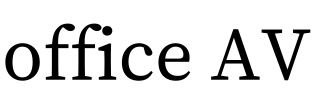
Source Serif 4: office AV · Standard ligatures off

Standard ligatures off

Advance width: 309.300 px

Download this SVG

To repeat the comparison, download the sample OTF, upload it above, enter office AV, and use size 75, kerning on, letter spacing and tracking 0, and stroke width 0. Toggle Ligatures to compare.

What the measurements mean

Advance width measures the line's layout distance, including font spacing; it is not the tight width of the visible ink. Both SVGs share a canvas and coordinate scale. Measurements describe this static CFF font and phrase only. A successful example does not establish support for every OTF or advanced typography feature.

Workflow

How to convert OTF to SVG

From a local font file to a reusable SVG in four steps.

  1. 1

    Open your OTF file

    Click Upload OTF beside Font Family and choose an extracted .otf file up to 20 MB. Confirm its filename appears below the selector. Before upload, the generator uses a sample font.

  2. 2

    Type the actual lettering

    Enter your name, label, or a single known character. For a useful first check, try office AV: it includes an ffi sequence and an angled letter pair. Confirm your font contains the characters.

  3. 3

    Check spacing and joins

    Keep fill on and stroke width at zero initially. Compare the Ligatures and Kerning settings separately, with letter spacing and tracking at zero. Changes depend on the font's data.

  4. 4

    Download and reopen SVG

    Download SVG from the output card. Open it in the intended vector editor and inspect accents, joins, outer strokes, and size. Preserve your original OTF for later wording changes.

Choose your output

Do you need lettering from your OTF font?

Use this page for specific words or a known character from your own OpenType file.

01

Create path artwork for

  • A wordmark from a purchased OTF
  • One letter or an encoded icon
  • Lettering for a vector or cutting editor
02

Use another workflow for

  • Browsing every alternate glyph or exporting the entire font.
  • Creating an installable font, webfont, or legacy SVG Font.
  • Preserving the color or texture of an OpenType-SVG font.

Direct answer

OTF to SVG here creates outline artwork from the text you enter using your OpenType font. The download contains those letter shapes, so the recipient can view them without the font installed. It does not contain every glyph or create an SVG Font. Keep your original wording and font for revisions: the exported letters are editable shapes rather than live text.

Three outputs that sound like OTF to SVG

A font file, an SVG image of lettering, and an SVG Font serve different purposes. Choose based on what you need to use after conversion.

  • This page creates ordinary SVG path artwork from the words you type. To export one character, enter that character alone.
  • A glyph collection would export many separate letter or icon shapes. This tool has no glyph browser or ZIP export of the complete font.
  • A legacy SVG Font stores a typeface using font and glyph elements. OpenType-SVG instead stores SVG glyph artwork inside an OpenType font. Neither is the output of this converter.

A repeatable OTF check: office AV

The downloadable Source Serif 4 example compares the same text with standard ligatures on and off. Both use the static Regular OTF from Adobe's 4.005 release, size 75, kerning on, zero extra spacing, and no stroke.

  • With ligatures enabled, ffi is substituted by one f_f_i glyph in this font. The sample's advance width changes from 309.300 to 302.175 coordinate units. This is a result for this exact font and phrase, not a universal spacing rule.
  • The two previews share a coordinate scale, so fitting each word to a different width does not hide the difference. Download the original OTF below and repeat the settings in the converter.
  • Try accents and a descender next, such as Café, Å, and gyp. A successful short sample checks only those characters; it does not prove complete language coverage or support for all OpenType features.

When an OpenType font loads differently

The .otf extension alone does not guarantee that every font feature will render. Outline structure, character coverage, and the shaping needed by your text all matter.

  • A static OTF with CFF outlines can produce SVG curves directly. You do not need an intermediate TTF conversion for a supported file; changing its extension does not change its format.
  • For a variable CFF2 font or an unreadable file, try a static OTF or TTF supplied by the designer. This interface does not expose arbitrary variable axes, stylistic sets, or every alternate glyph.
  • Color or textured OpenType-SVG lettering may need a color-aware workflow. Do not expect this outline converter to preserve embedded SVG artwork, gradients, bitmap texture, or color layers.
  • A missing character can appear as a box even when the font opens. Check the active filename and use a font containing that character. If long text triggers a limit, shorten it or use Generate Preview when offered.

Check your OTF lettering before handoff

Inspect the exact phrase at its final size, including after importing the downloaded SVG.

  • Confirm the displayed filename is your uploaded OTF, rather than the sample font.
  • Check accents, punctuation, and symbols against the original design.
  • Inspect ffi, fi, and other joins with the actual Ligatures setting you intend to export.
  • Check that swashes and descenders fit inside the imported artwork's bounds.
  • For cutting, verify physical units, counters, and overlapping outlines. Export does not weld shapes, add bridges, or generate machine instructions.

Choose the output your project needs

A fixed visual asset and an installable font have different requirements.

Option
Use when
Watch out
OTF to SVG paths
You need the specific words or character you enter as vector artwork.
The exported letters are shapes. Text changes require another export.
Individual glyph extraction
You need to browse unencoded alternates or export an icon collection.
Use a font editor or dedicated glyph exporter; this page does not export a complete glyph set.
Webfont or font-format conversion
You need editable web text or an installable TTF or WOFF file.
Keep a font workflow. An SVG path image is not a replacement webfont.

What you can verify about this conversion

The sample files, settings, and primary sources make the method inspectable. A successful sample does not guarantee compatibility with every OTF.

A real CFF source
The example includes Adobe's unmodified static Source Serif 4 OTF and its SIL Open Font License. Both SVG samples are generated from that file.
Browser file reading
Your selected font is parsed from browser memory with OpenType.js. This conversion does not send it to our server. Page assets and selected Google Fonts can still make network requests.
Visible output limits
Only the typed lettering is exported. The converter does not promise color-font reproduction, complete advanced shaping, or batch glyph extraction. Path generation failure does not fall back to font-dependent text on this page.
Keep a revision source
The tool does not save your font and wording as a project. Reloading clears the uploaded font selection. Keep the source file and approved wording for revisions.

OTF to SVG questions

1

Does this OTF to SVG converter export the entire font?

It exports only the text you enter as SVG paths. For a single letter or encoded icon, enter that character. Exporting every glyph, including alternates without a character code, requires a glyph browser or font editor.
2

Do I need to convert OTF to TTF first?

No intermediate conversion is needed for a supported static OTF. The sample uses CFF outlines directly. If your file cannot be parsed, get a static OTF or TTF from the provider; renaming the extension will not repair it.
3

Will it preserve ligatures, swashes, and alternate letters?

The generator offers kerning and standard ligatures. The Source Serif 4 sample demonstrates ffi substitution, but it is not a guarantee for every font. Stylistic sets, discretionary ligatures, and unencoded swashes have no dedicated selection controls here. Compare the exact wording with your intended design.
4

Can I convert an OpenType-SVG color font?

Do not rely on this tool to preserve color or texture. OpenType-SVG is a color-font format containing SVG glyph descriptions inside a font, which is different from exporting ordinary SVG outlines. Use a workflow that supports that font's color artwork.Microsoft: the OpenType SVG table
5

Why does a character become a box or disappear?

The uploaded font may lack that character, or the text may need shaping this engine cannot fully perform. Confirm the active filename, test a known supported character, and compare with the font provider's specimen. Conversion does not add missing letterforms.
6

Is OTF to SVG free, and is my font uploaded?

The tool is free to use without an account. Your selected font is read locally for conversion, subject to the 20 MB upload limit and the generator's text limits. The webpage and sample fonts still need network requests; reloading clears your uploaded selection.
7

Can I use the SVG in Figma, Illustrator, or a cutting app?

The output is standard path artwork; import it and check the result in the target application. For cutting, inspect scale and overlaps and add any required supports for enclosed areas. This converter does not automatically weld touching script letters or prepare a complete machine job.

Related workflows