SVG FILE LIBRARY / 12 EXPORTS

Real SVG files, ready to inspect.

These are saved text-to-path exports, not live font previews. Open or download a file, check its actual outlines, then recreate the result with your own text.

Find a file by use

Pick a use case, then inspect a real export and its file details.

01 / 04

Wordmarks & badges

Compact outlined lettering for marks and emblems.

FILE / 01.01Northlinenorthline-wordmark.svg

Northline wordmark

A compact product wordmark to inspect at header sizes.

What to inspect

Scale the file down to a header-sized slot and check whether the curved letterforms remain clear.

Canvas
439.047 × 120.156 px
Path elements
1
File size
4.8 KB

Generated with: Inter · weight 700 · size 96px · no stroke

FILE / 01.02NORTH STUDIOnorth-studio.svg

North Studio badge

A broad geometric all caps mark for a badge layout.

What to inspect

Compare the full wordmark width with the space available inside your badge layout.

Canvas
573.66 × 89.33 px
Path elements
1
File size
5.8 KB

Generated with: Montserrat · weight 700 · size 70px · no stroke

02 / 04

Signs & fabrication

Lettering to inspect for scale, spacing, and contours.

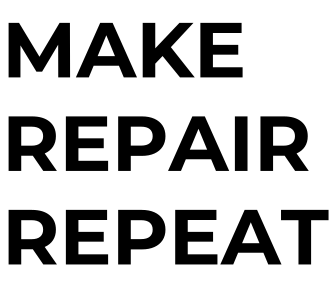
FILE / 02.01MAKE / REPAIR / REPEATmake-repair-repeat.svg

Workshop sign study

Three lines for checking scale, letter islands, and material layout.

What to inspect

Check line spacing and enclosed letter shapes, then confirm the overall size in your target software.

Canvas
331.054 × 286.282 px
Path elements
3
File size
5.4 KB

Generated with: Montserrat · weight 700 · size 78px · no stroke

FILE / 02.02LASER CUTlaser-cut-heading.svg

Laser heading

A condensed uppercase test for spacing and narrow cuts.

What to inspect

Zoom in on the narrow gaps and inner openings before using the outlines for cutting.

Canvas
355.23 × 136 px
Path elements
1
File size
3.3 KB

Generated with: Bebas Neue · weight 400 · size 110px · no stroke

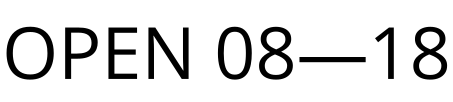
FILE / 02.03OPEN 08—18open-hours.svg

Opening hours sign

A practical sign with numerals and an en dash to inspect.

What to inspect

Check the spacing between the numbers and the long dash after scaling the sign.

Canvas
452.91 × 102.051 px
Path elements
1
File size
6.5 KB

Generated with: Open Sans · weight 400 · size 72px · no stroke

03 / 04

Interface & games

Short labels, bold tags, and pixel-style display text.

FILE / 03.01PIXEL MODEpixel-mode.svg

Pixel mode badge

Block-shaped lettering for game and interface artwork.

What to inspect

Check the stepped corners at normal size and again after enlarging the SVG.

Canvas
563.6 × 124 px
Path elements
1
File size
3.1 KB

Generated with: Pixelify Sans · weight 700 · size 100px · no stroke

FILE / 03.02SIGNAL / 01signal-label.svg

Signal interface label

A compact number and slash sample for UI annotation.

What to inspect

Check the space around the slash and whether the numerals stay legible at interface size.

Canvas
401.09 × 88.375 px
Path elements
1
File size
4.7 KB

Generated with: Roboto · weight 500 · size 72px · no stroke

FILE / 03.03PROTOTYPEprototype-tag.svg

Prototype web tag

Heavy uppercase lettering for a compact product label.

What to inspect

Reduce the SVG to tag size and see whether adjacent uppercase letters remain distinct.

Canvas
466.524 × 94.747 px
Path elements
1
File size
4.3 KB

Generated with: Inter · weight 700 · size 75px · no stroke

04 / 04

Editorial & print

Titles, invitations, and a bilingual label.

FILE / 04.01The Sunday Editeditorial-title.svg

Editorial title

Serif contours that reveal the effect of fine details on file size.

What to inspect

Look at the thin serifs at your intended display size and inspect their contours when zoomed in.

Canvas
592.276 × 107.974 px
Path elements
1
File size
16.9 KB

Generated with: Playfair Display · weight 700 · size 78px · no stroke

FILE / 04.02東京 DESIGNtokyo-label.svg

Tokyo bilingual label

Japanese and Latin glyphs in one outlined asset.

What to inspect

Compare Japanese and Latin character heights and the spacing where the two scripts meet.

Canvas
470.128 × 116.944 px
Path elements
1
File size
5.7 KB

Generated with: Noto Sans JP · weight 700 · size 78px · no stroke

FILE / 04.03Weekendweekend-script.svg

Weekend invitation

Connected script outlines for a printed invitation study.

What to inspect

Zoom into the connected strokes and tight curves before placing the lettering in print artwork.

Canvas
369.49 × 162.04 px
Path elements
1
File size
9.6 KB

Generated with: Pacifico · weight 400 · size 90px · no stroke

FILE / 04.04The Archivethe-archive.svg

The Archive masthead

A high contrast serif title for editorial artwork.

What to inspect

Check whether the thin strokes remain visible at the masthead size you plan to use.

Canvas
444 × 110.64 px
Path elements
1
File size
10.6 KB

Generated with: Playfair Display · weight 700 · size 80px · no stroke

How to inspect a sample file

  1. 01

    Choose a file

    Browse by use and read the inspection note beside a file that matches your task.

  2. 02

    Download and inspect

    Open the saved SVG or download it into your target software. Check its scale and contours there.

  3. 03

    Make your own version

    Use “Recreate in generator” to load the source text and settings, then change what you need.

What these files contain

The files contain outlined paths and the measurements shown on each card. They are design samples, not records of software import or physical cutting. Confirm scale and contour behavior in your own receiving tool.

Questions about the example files

1

Can I change the wording inside a downloaded SVG?

The letters are outline paths, not editable text. You can edit their vector nodes, or use “Recreate in generator” to generate a new SVG with different wording.
2

Do I need to install the sample font to open the SVG?

No. The SVG contains the letter outlines. You need the font only if you want to recreate or change the lettering in another tool.
3

What do canvas size and path elements mean?

The dimensions are the SVG canvas width and height in pixels. Path count means the number of SVG path elements; it is not a count of individual letters or cutting contours.
4

Have these files been tested in design software or physically cut?

No. They are generated design samples. Import, physical size, and cutting behavior need to be checked in your own software and material setup.
SVG Example Files | Download Real Text Paths