Script font generator

Lobster Font to SVG Converter

Create flowing retro wordmarks with the free Lobster font to SVG converter for food labels, playful signs, and concise connected lettering. Edit the text below and export it as SVG paths or DXF with Lobster already selected.

Text To SVG Options
Text To SVG Preview
Enter text to see preview
SVG Options

Fine-tune export units, fill behavior, and stroke output.

Text To SVG Output

Font specimenGood Company / 400

Get to know the typeface

About Lobster

Best use cases

  • retro logos
  • food labels
  • stickers
  • casual signage

Converting the Lobster font to SVG suits short retro wordmarks, food labels, and playful shop lettering. Its connected script gives the name a flowing outline that differs from a row of separate upright letters. Use a concise word or phrase so the joins remain easy to inspect. A technical label or long instruction will usually read more clearly in a simpler sans serif.

What to look for

Inspect connections between neighbouring letters, enclosed loops, and projecting terminals in the actual word. A script can look connected at a large preview size while hiding thin joins that become fragile when reduced. Check the first and last letters as well as the middle of the word. Leave room around overhangs and avoid cropping the export tightly against a decorative stroke.

Category
Script
Variable font
No
Italic support
No
Available weights
400

Same text · same scale

Compare Lobster outlines

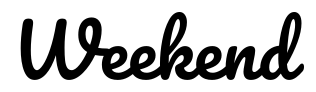
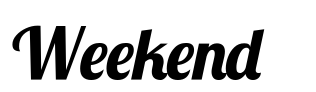
Weekend is outlined in Lobster and Pacifico at 400 with zero tracking. Inspect joins and loops as well as word width. These are visible contours, not a test of whether a cutting app has welded the overlaps.

Sample text: Weekend

Lobster · 400

Text width at 72 px: 249.3 px

Weekend outlined in Lobster, weight 400

Pacifico · 400

Text width at 72 px: 283.1 px

Weekend outlined in Pacifico, weight 400

For this sample, Lobster · 400 uses 12% less line width than Pacifico · 400.

How this comparison was made

Both samples were generated from the built-in font catalog at 72 px, with kerning and standard ligatures on, zero added tracking, and no stroke. They share a coordinate scale and baseline; on small screens both shrink by the same factor. Width is the laid-out advance, including character spacing, rather than the visible outline bounds. Results apply to these font files and this text; equal weight numbers do not imply equal visual darkness. This is a layout comparison, not a readability score or a manufacturing test.

A starting point for Lobster

Try in the converter
Label weight
400
Display weight
400
Letter spacing
0em
Curve accuracy
High

Use these as visual starting points and check your actual wording at its final size. Production limits depend on the process, material, and tool; the comparison above is not a material test.

Fine-tune the spacing

Converting the Lobster font to SVG uses its single regular 400 style. Keep kerning and standard ligatures enabled and start with zero tracking so the intended connections can form. Large letter-spacing changes can break the script rhythm. To make a small word more robust, enlarge the artwork or choose another family rather than expecting a bold variant or using a thick stroke to close every gap.

Lobster Font to SVG export guide

SVG serves design and web graphics, DXF serves compatible CAD workflows, and JSX or TSX provides outlined React components. Choose the format your destination supports.

SVG / JSX / TSX

For screens & design tools

For a short shop name, inspect the actual joins, loops, and first and last strokes at zero added tracking. Compare the same word with Pacifico. Move the script as a complete word when possible so independent letter placement does not break connections.

SVG / DXF

For cutting & engraving

Before cutting, inspect whether touching letters are overlapping contours rather than a welded shape. Apply a union in the destination software if the workflow needs it, then recheck loops and counter support. Visual contact alone does not prove production-ready geometry.

Before you download

  • Use short words so the script connections remain easy to inspect.
  • Keep stroke output simple; decorative scripts already have complex contours.
  • Preview holes and joins before cutting connected letter shapes.

Review letter connections, loops, overhangs, and any overlapping cut contours. Keep an untouched SVG before welding or editing shapes. For fabrication, measure the thinnest join, plan loose counters, and test the exact word at its final material size.

Lobster FAQ

1

What wording works best in a Lobster SVG?

Short names, food labels, and retro wordmarks make the connected script easier to inspect. Check joins, loops, and overhangs in the exact word. A long instruction or a tiny technical label is usually clearer in a simpler upright family.
2

Does Lobster have bold weights for SVG conversion?

This converter provides Lobster as a single regular 400 cut. Keep kerning and standard ligatures enabled and begin with zero tracking. If a small word needs more strength, enlarge the output or choose a different family instead of expecting a separate bold style.
3

Are touching Lobster letters automatically welded into one shape?

No. Lettering can look connected while retaining overlapping contours. Exporting paths does not promise a boolean union. Inspect the word in your cutting software and weld where the workflow requires a single contour, then check whether any internal loops also need support.
4

Why can added letter spacing break a Lobster wordmark?

The script relies on neighbouring letters meeting as intended. Start with zero added tracking and keep kerning and standard ligatures enabled. If the word needs more room, enlarge or reposition the whole asset before pulling every letter apart. Inspect the actual joins after any spacing adjustment.
5

How should I choose between Lobster and Pacifico?

Compare Weekend at 400 in both families. Look at the entry and exit strokes, joins, loops, and measured word width. Use your own shop or product name next, because a script connection that looks good in Weekend may behave differently in another letter sequence.
6

Can I use Lobster for laser cutting or engraving?

Lobster needs inspection of thin joins, enclosed loops, and overlapping contours. Weld shapes in the production tool if the cutting process requires one continuous boundary, and plan bridges or backing for loose centres. SVG or DXF export does not perform those preparation steps automatically.
Lobster Font to SVG Converter & Preview