Curved Text to SVG Generator

Create an upper arc, lower arc or full circle of text, then download SVG paths that keep their letter shapes without the font installed. Adjust the baseline radius, size, spacing and rotation in your browser.

Upper and lower arcs
Full circle
Font-independent SVG
Local processing

Try a worked example

ABeeZee Regular · 64 px. Examples use the same settings as the worked recipe below.

Text options

Use up to 80 characters on one line. (14 / 80)

TTF, OTF or WOFF · up to 20 MB · processed on your device

Curve options

SVG preview

Loading font and drawing paths…

Preview fits the canvas; it does not represent a physical print size.

SVG output

Canvas (px)
—
Visible glyph paths
—
Baseline sweep
—
SVG file size
—

Inspect an exported SVG

Paths only. No embedded font, live text or cutting guide. Physical dimensions, overlaps and stencil bridges need a check in your destination software.

Three real SVG exports to inspect

Download these outlines or reproduce them with the example buttons above. All use ABeeZee Regular, 64 px, radius 180 px and rotation 0°. The two arcs use 2 px spacing; the circle distributes spacing automatically. These are generated layout examples, not material-test results.
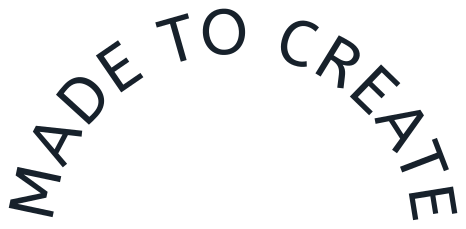
Upper arc: MADE TO CREATE

Upper arc

466 × 229 px · 173.1° · 12 paths

Download SVG
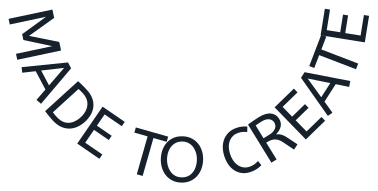
Lower arc: MADE TO CREATE

Lower arc

378 × 191 px · 173.1° · 12 paths

Download SVG
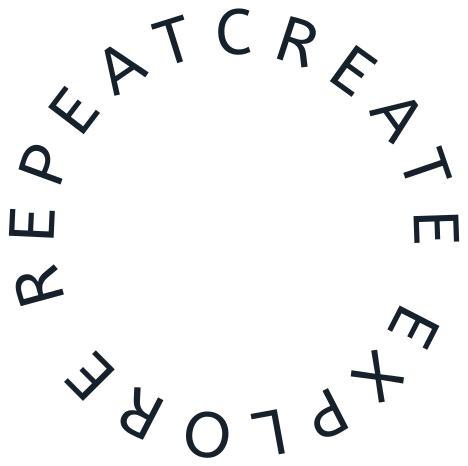
Full circle: CREATE EXPLORE REPEAT

Full circle

468 × 466 px · 360° · 19 paths

Download SVG

Workflow

Step-by-step workflow

Follow these steps after choosing the right output format. The goal is to catch format, scale, and handoff problems before export.

  1. 1

    Choose text and a font

    Start with one short line. ABeeZee Regular is included locally; other listed Google Fonts are fetched when selected. You can also upload a TTF, OTF or WOFF file up to 20 MB. Check accents and symbols before adjusting the curve.

  2. 2

    Set the circular baseline

    Choose an upper arc, lower arc or full circle. Radius is measured from the circle centre to the text baseline, not to the outside edge of the letters. Increase radius for a gentler arc; increase font size for larger letterforms.

  3. 3

    Inspect spacing at the intended size

    Arc mode keeps your pixel spacing between glyph advances. Full circle distributes the remaining circumference automatically. Inspect narrow gaps, the start/end seam and counters such as A and O; an even mathematical gap is not always an even visual gap.

  4. 4

    Download paths and reopen the SVG

    Download the SVG and open it in your destination editor. Confirm the spelling, dimensions and closed counters. For fabrication, set the final physical size, resolve overlapping outlines, add any needed bridges and test the actual material.

Quick decision

Is this the right export path?

Choose the workflow based on what must happen after the text becomes geometry.

01

Use this tool when

  • Badges and round labels
  • Fixed logo and sticker lettering
  • Cutting and engraving drafts
02

Choose another path when

  • The text needs to remain editable in the destination software.
  • The output is ordinary reading text rather than a visual asset.

Direct answer

This curved text to SVG generator places font outlines along a circular baseline. Each glyph is rotated into position without bending its individual shape, and the resulting coordinates are written directly into SVG paths. The exported artwork contains no live text, textPath or embedded font. Use it for fixed badge lettering, circular labels and design handoffs where the exact letter shapes matter. Keep the original wording and font name separately: the download is editable as shapes, not as text. It is a layout export, not a welded cut file or a machine toolpath.

A reproducible arc recipe

Load Badge arc above: MADE TO CREATE, ABeeZee Regular, 64 px, radius 180 px, spacing 2 px and rotation 0°. It uses the same bundled font and geometry engine as the downloadable example below. This is a generated layout study; it is not evidence of a physical cutting test.

  • Change only the radius from 180 to 300 px. The baseline sweep becomes 60% of its original angle because the text advance stays fixed while the radius grows.
  • Load Bottom label to compare the same phrase on the lower side of a circle. Letters remain upright near the middle; their tangent rotations follow the new baseline.
  • Load Circle stamp for CREATE EXPLORE REPEAT at 64 px and radius 180 px. Remaining circumference is shared between glyphs, and rotation moves the seam around the circle.

Radius, spacing and output size are different controls

A 180 px baseline radius does not promise a 360 px-wide SVG. An arc occupies only part of a circle, and ascenders, descenders and side bearings extend beyond the baseline. The exported canvas is fitted to the actual transformed outline bounds with padding.

  • For an arc, sweep in radians equals the laid-out text advance divided by radius. Increasing spacing raises the sweep if the radius stays fixed.
  • Arc coverage is limited to 300°. If the phrase exceeds that coverage, increase radius, reduce size or shorten the wording. Full-circle mode checks that natural glyph advances fit the circumference.
  • A fit warning concerns baseline capacity. It cannot detect every collision between italic swashes, adjacent contours or unusually wide glyphs. Inspect those shapes in the preview.

What stays fixed after export

Each visible glyph becomes a path with its placement baked into the coordinates. The baseline itself is not exported as a cutting guide. Spaces affect layout without creating visible path elements, and ligatures can combine multiple letters into one glyph.

  • The SVG contains a descriptive title, a fill group and paths. It has no external font reference or textPath dependency.
  • SVG dimensions are pixels. Choose the final millimetres or inches in your destination software, then inspect the smallest detail at that physical size.
  • The tool supports one line up to 80 characters and the font parser’s available shaping. Missing glyphs block export; connected scripts, combining marks and advanced typography still need a careful visual check.

Curved SVG export checks

Review the geometry after import, not only the fitted browser preview.

  • Read every letter, accent and symbol in the final phrase.
  • Check the circle seam and the nearest neighbouring outlines.
  • Confirm that counters remain open at the final size.
  • Measure the imported width and height in the destination software.
  • Resolve overlapping contours before cutting where your machine requires a union.
  • Keep an editable text master and the font details for later changes.

Outlined curves, live text or straight lettering?

Choose the representation that matches what the next person needs to edit.

Option
Use when
Watch out
Curved SVG paths
The shape must stay fixed across devices, fonts and vector-editor handoffs.
Wording becomes geometry. Outlining does not make a font licence optional or make a file ready to cut.
Live SVG textPath
A web graphic needs editable text following a path and you control font availability.
It still uses text and font resources; some design or cutter imports handle it differently.
Straight text to SVG / DXF
You need the main generator’s straight layout, DXF export or React component downloads.
Those tools do not apply this page’s curved layout. This generator exports SVG only.

How to assess this output

The controls, downloadable examples and visible SVG source let you check the claims on this page.

Local text and font processing
Text layout and uploaded font parsing run in your browser. Uploaded fonts are not sent to our conversion server. The page and selected Google Fonts still require network requests.
Inspect the actual geometry
Open Show SVG source to examine the paths. Radius, size and rotation change actual outline coordinates; the result is not a screenshot or a font-dependent preview.
Generated examples, stated limits
The supplied examples are produced by the same engine using the bundled ABeeZee font. They demonstrate layout and export, not a passed Cricut, laser or material test.
Corrections and source notes
The Cricut answer links to its official import requirements. The recipe and parameter explanations describe this implementation. Report an incorrect outline through our contact page with the font and settings.

Common questions

1

Does the curved text SVG need the original font?

No. The export contains glyph outlines with their positions written into the path coordinates. Keep the font and original wording for revisions, but another device does not need the font to display the shapes.
2

Can I edit the words after downloading?

You can edit path nodes and individual shapes in a vector editor. You cannot use a text cursor to change the words in this SVG. Change the text here and export again, or retain an editable text master.
3

Why does reducing the radius cause a warning?

The same text needs a larger angle on a smaller circle. Arc mode stops beyond 300° and full-circle mode checks the available circumference. Increase radius, shrink the font or shorten the phrase, then inspect overlaps separately.
4

Can I use the file in Cricut Design Space?

Cricut documents that imported SVG files cannot contain editable text. This export uses paths instead. Still check dimensions and overlapping contours after import; this page has not certified every Design Space version, operation or machine.Cricut official guidance
5

Does it make single-line engraving text or stencil bridges?

No. It places the font’s existing outlines along a circle. It does not trace a centreline, join touching glyphs, add bridges or calculate toolpaths. Those are separate font-selection and production steps.
6

Can I upload my own font or export DXF?

You can upload TTF, OTF or WOFF fonts up to 20 MB; use a static font if a variable or unusual font fails to parse. This curved tool exports SVG. The straight Text to DXF tool is linked below for CAD-oriented lettering.

Related workflows

Curved Text to SVG Generator – Free Arc & Circle